
Increase your spending limit
What's the spending limit?
SMS usage, plan overages or with certain plans follow-ups are billed as usage charges. Shopify applies an app spending limit to protect you from unexpected charges. When the limit is reached, Kindly can’t add more usage charges— so Kindly may pauses follow ups until you increase the limit.
Increase the spending limit in Shopify Admin
In Shopify Admin, go to Settings > Apps > Kindly.
Select Usage charges to view Kindly’s current usage charges and limits.
Under New app spending limit enter the new amount you want, then click Save.
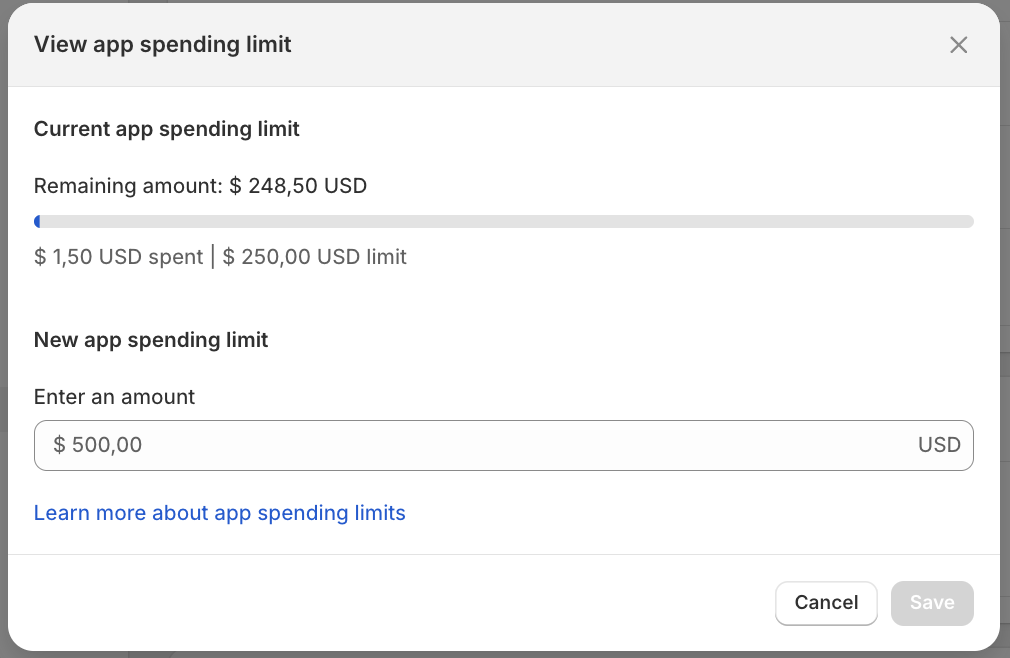
Set a limit with some buffer so reminders don’t pause mid-campaign.